

If you make a purchase after clicking on links within this article, Lee Enterprises may earn affiliate commissions. The news and editorial departments had no role in the creation or display of this content.
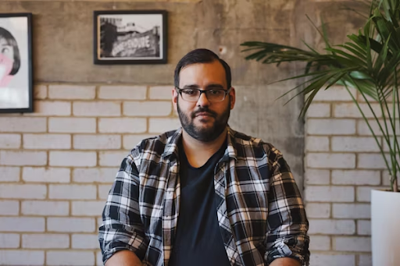
Top AI headshot generators apply intelligent algorithms to create professional-quality profile photos in a flash. With just a few easy uploads, users receive crisp, premium-quality images perfect for social sites, job portals, or team pages.
These tools eliminate the requirement for expensive equipment or extended photo shoots. Others provide style selections such as business, casual, or creative.
To assist in choosing the best fit, this post features some of reviewers’ top AI headshot generator picks for entrepreneurs and creators.
1. Portrait Pal
People are also reading…
Users begin by uploading six pictures of themselves. These pictures don’t have to be professional; spur-of-the-moment selfies in varying light and garments are great. This allows the AI to identify unique facial characteristics and generate more precise outputs.
After uploading pictures, it takes users just two minutes to do the initial work, including the payment. The base price of $35 is consistent with other comparable paid services.
Once all is configured, the AI starts generating headshots, with a turnaround time of about 60 to 120 minutes. They present users with approximately 65 headshot selections to peruse.
These photos aren’t just randomly generated; the platform provides the option to adjust facial expressions, backgrounds, and other minor modifications.
From tech to creative to corporate, users can select the right headshot style for their industry and brand through their customizable backgrounds. Every image it produces is high-res. This makes sure that headshots appear sharp and clean on various platforms, ranging from LinkedIn to company sites or email signatures.
2. Artbreeder
Artbreeder is all about the blending — you can mix and match traits from different images to create unique headshots. Artbreeder operates on generative, discriminative, and loss function deep learning models to create these hybrids. For instance, you can begin with a base portrait and then merge in faces or stylizations from other images to make it tailor to your appearance or mood.
3. Fotor
Known for its user-friendly interface and extensive editing options, Fotor is a no-nonsense pick for anyone wanting to enhance their AI headshot experience. There’s no signup needed, so you can jump in immediately. It’s nice that you only need to upload a single photo to get going. This offers relief to those who don’t want to track down additional images.
Fotor’s editing dashboard offers core features like brightness, contrast, and sharpness sliders. For instance, users can increase face clarity or adjust the color tone to better suit their branding. The editing tools are all clearly laid out, so even beginners can keep up.
Fotor’s AI headshot generator gets the job done fast and leaves a sleek, professional spin. Once you upload a photo, you select among hundreds of styles, from classic business to creative. It’s a 9-minute process, and they notify you when your headshot is ready.
Fotor removes all uploaded images within 24 hours, safeguarding user confidentiality. The total turnaround time for creating and editing a headshot is around 2 hours, which fits well with users who have busy schedules.
4. ProfilePicture.ai
This tool allows you to upload your images and then uses AI to touch up and enhance photos. The AI requests some simple information, such as gender, eye color, and hair color, which allows it to align the outcomes with a user’s actual appearance.
Most customers receive their completed photos within 30 to 45 minutes, which is perfect for those looking for something fast.
There is a wide variety of styles and formats available on the platform. Users can select from traditional business styles, artistic creations, or even cartoon animations. For a LinkedIn update, a nice, clean business style type of image is best, whereas for social media or creative portfolios, users tend to gravitate towards more colorful and playful designs.
5. Profile Bakery
For those of you who need a serious style upgrade, Profile Bakery provides a vast template and design asset library.
Templates can involve traditional studio lighting, tone shifts, or gentle blur for a dreamier feel. A healthcare template features a soft blue background with gentle shadows, while a business option introduces a crisp light backdrop and subtle contrast. These let you customize your headshot to your industry or personality.
The platform uses robust AI tools for photo optimization, resulting in sharper, more detailed images. The AI deblurs, equalizes lighting, and adds facial detail without filters.
Once you’ve uploaded a 300 KB to 4 MB photo, the turnaround is quick. The majority of users receive a download link email in less than two hours. Choices for quick edits, such as cropping, rotating, or swapping background, allow users to polish off their headshot in a quick sitting.
This is convenient for those last-second job applications or profile edits. Profile Bakery has a few pricing packages, from $10 to $70, so there are options. These headshots work for all sorts of professional use, from CVs to online portfolios.
6. HeadshotPro
HeadshotPro stands out for its sharp focus on top-tier headshots made for the business world. Many users turn to HeadshotPro when they want their photos to look polished, credible, and ready for use on global company websites or professional networks. The service highlights corporate-friendly styles, so the results fit well with LinkedIn profiles, company directories, or executive bios.
With a simple, clean interface, the entire workflow is accessible to users with limited prior photo editing experience. To begin, users submit their photos directly from a computer or phone. In most cases, the workflow takes just a few steps: pick style, upload images, make basic tweaks, and preview results. This accessible method allows anyone–tech-savvy or otherwise–to snag their headshots hassle-free.
HeadshotPro’s pricing aligns with others on the market, beginning at around $35, while higher tiers provide additional functionality or additional images.
Conclusion
Identifying the top AI headshot tool suddenly seems a lot simpler when you have the facts. Each of these choices, such as Fotor for fast edits or Portrait Pal for crisp pro shots, fits different requirements. Some people want an artsy style, while some people just need a professional-looking work photo. These tools allow people to make an impact online, save time, and avoid extended photoshoots. Results are ideal for LinkedIn, web bios, or even just a playful profile refresh. Take a few for the best shot and experiment to see which fits your style and goals.
Frequently Asked Questions
What is an AI headshot generator?
An AI headshot generator leverages artificial intelligence to produce high-quality, professional portraits. You upload your picture and the tool enhances it or morphs it into a nice, resume-appropriate, social-appropriate, biz-appropriate headshot.
Are AI headshot tools safe to use?
Some of the most reliable AI headshot tools safeguard user privacy and data. Check privacy policies and user reviews before uploading personal photos anywhere.
How accurate are AI-generated headshots?
AI headshots can come across as extremely realistic and professional. Accuracy varies with the quality of your uploaded photo and the platform's technology.
Do I need photography skills to use AI headshot tools?
No photography required. They are incredibly simple to use. You just upload your image, and the AI does the rest of the editing and enhancement.
Which industries benefit most from AI headshots?
AI headshots are big in business, creative, technology, and remote work. They assist users in swiftly obtaining professional photos for networking, resumes, and online profiles.